← MemScape

A development journal · October 2026

The memories
came home.

By Steve Trefethen · Written with agent assistance from my development records.

An old Day One archive. Five days of building.
A place for the next memory.

1,404entries recovered
256original photographs
5days in the core build

The core build: October 22–26, 2026. An earlier planning session and an epilogue through October 31 complete the account. Written retrospectively from development sessions, plans, tickets, commits and retained screenshots.

Prologue

The memories were still there

I stopped using Day One years ago, but I never stopped liking what it did. A few words, a photo, the weather and the place were enough to bring an ordinary day back.

I still had my Day One Classic archive. What I wanted was a good way to use it again—and somewhere to keep writing.

On October 11, I started planning that app. We inventoried a December 2020 export and found 1,404 entries and 256 photographs, covering November 2012 through October 2018. About 136,000 words. There was a lot there worth bringing back.

The archive gave us a concrete set of requirements. Five pairs of entries shared the same minute. Twenty-nine entries had no body. Tabs and single newlines mattered. Some weather records had a description but no temperature. I wanted the importer to preserve what was there, including the odd cases.

The five days in this story are October 22–26, when implementation got underway. The earlier planning session belongs here because it established what we were building and why.

Day 1

1,404 entries come home

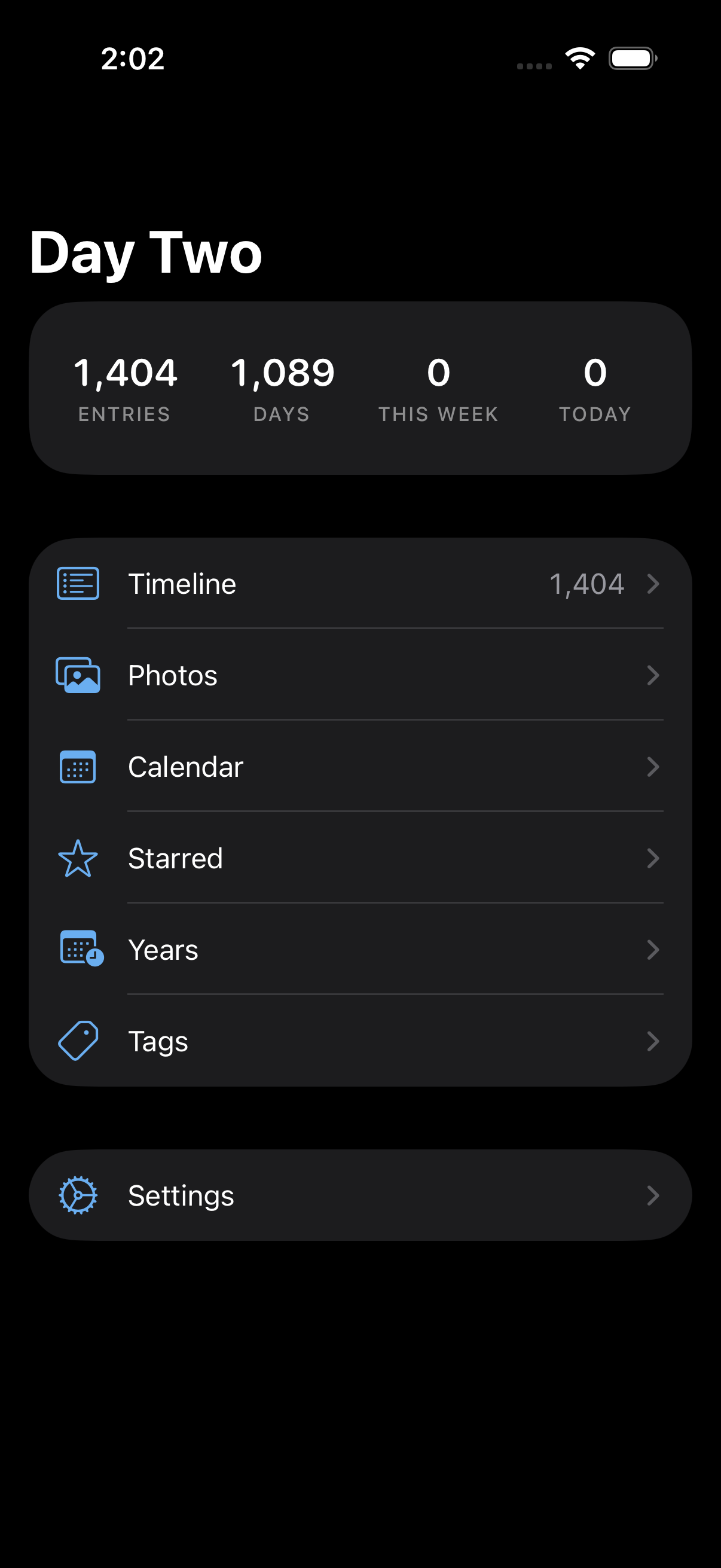
Original Day Two menu; retained October 22 simulator capture, personal archive counts.

The first milestone was seeing the numbers I expected: 1,404 entries across 1,089 days.

Day Two’s menu gave me Timeline, Photos, Calendar, Starred, Years and Tags. Search made years of notes useful again. I could find something without remembering exactly when I had written it.

I wanted to keep the useful density of Classic: a title, a little of the text, a clear day number, the place and the weather. Underneath that interface, the importer had to respect the original text and keep each photograph with its entry. Importing the same archive again needed to skip existing entries without overwriting later edits.

On October 22, I accepted the foundation on my iPhone 16 Pro. I could see the journal folder in Files. The entries were JSON and the photographs were JPEGs. Keeping the journal in files I could access was a requirement from the start.

This dark-mode menu is a simulator screenshot from that day. It says “0 today.” We had brought the old entries back; I had not added the next one yet.

Day 1

A small blue promise

Original blue Day Two icon, exact Git blob from scaffold commit 01b9358.

The first icon was a blue square with a white 2. I called the app Day Two, a working name for picking up where Day One had left off.

Before implementation, I asked for separation of concerns. I did not want a fast first build that immediately turned into a handful of giant modules.

We gave one store responsibility for writes, kept views reading snapshots, and made the journal folder the source of truth. Thumbnails and indexes could be rebuilt. The units had explicit dependencies, with a check to enforce them. Those decisions gave the agents clear responsibilities as the work expanded.

In my account of that first build, I described sixteen agents, about 8,500 lines of code, about 3,400 lines of tests, and two rounds of fresh-eyes review. Those were my first-build figures, rather than measurements of the app today. The useful part was having a structure that let the pieces fit together.

This is the actual icon from the first scaffold commit. I like keeping it here because it shows just how early we were.

Day 1

The archive gets a future tense

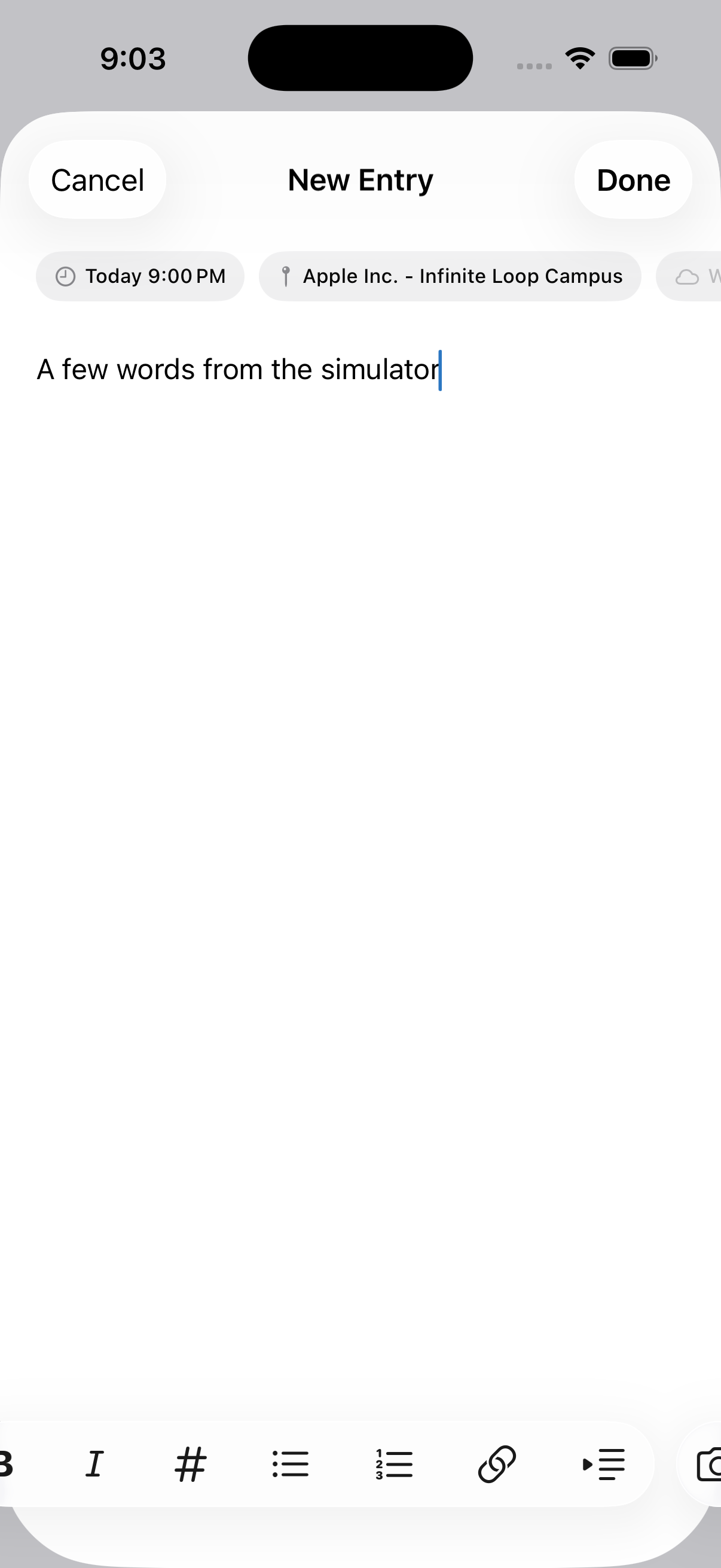
Original editor simulator capture with demonstration text.

By that evening, Day Two could create entries as well as read them.

Our second plan added the editor, a Markdown accessory bar, photos, tags, starring and deletion. Location, weather, motion and music capture had separate responsibilities. The editor also had to handle ordinary interruptions, such as opening the camera while writing.

That was an important change for me. I was building a place to continue the journal, as well as a way to read the archive. The simulator entry in this screenshot says “A few words from the simulator.” A small test, but it shows we had reached that point.

We made corrections as we went: keep coordinates out of a weather failure log, avoid inventing a weather condition, and preserve the editor underneath the camera.

Writing and capture were built on October 22. I completed the device acceptance on October 24. Getting a feature into a build and being satisfied with it on my phone were separate steps.

Day 2

Entry number 1,405

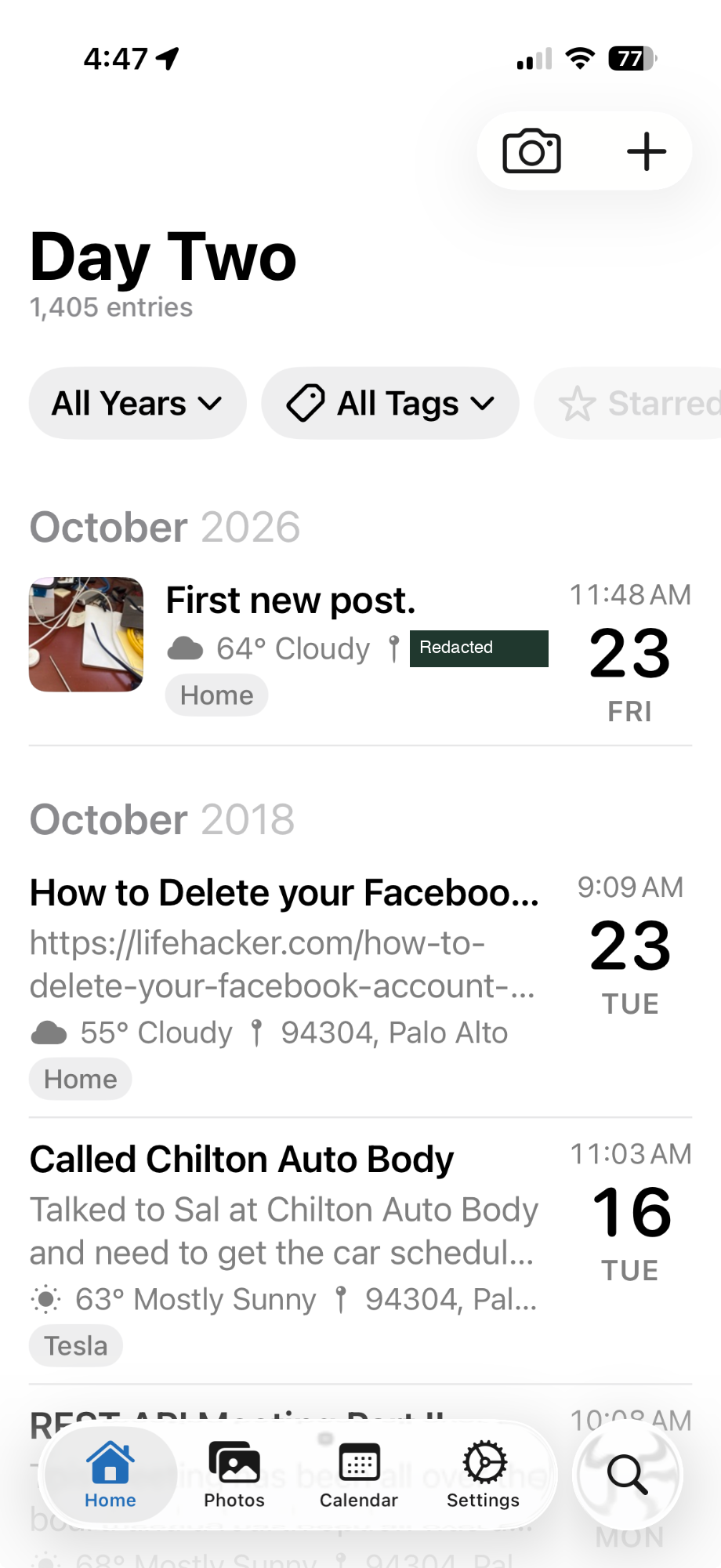
My phone screenshot: Day Two, 1,405 entries and First new post.  Home-address text redacted with an opaque mask.
My phone screenshot: Day Two, 1,405 entries and First new post. Home-address text redacted with an opaque mask.

The number at the top of this screenshot is the part I care about: 1,405 entries.

One more than the archive.

“First new post.” sits above the October 2018 entries, with a photo of my desk beside it. I had started writing in the journal again.

I shared this screenshot because I wanted “Day Two” moved upward to reclaim some whitespace. Looking back, it captures a more useful milestone than the layout issue I was pointing out. The app was already doing what I had built it for.

I could open it to revisit an old entry or add something new alongside it.

This is my original phone screenshot, with only the home-address fragment redacted.

Day 2

A way back into an ordinary day

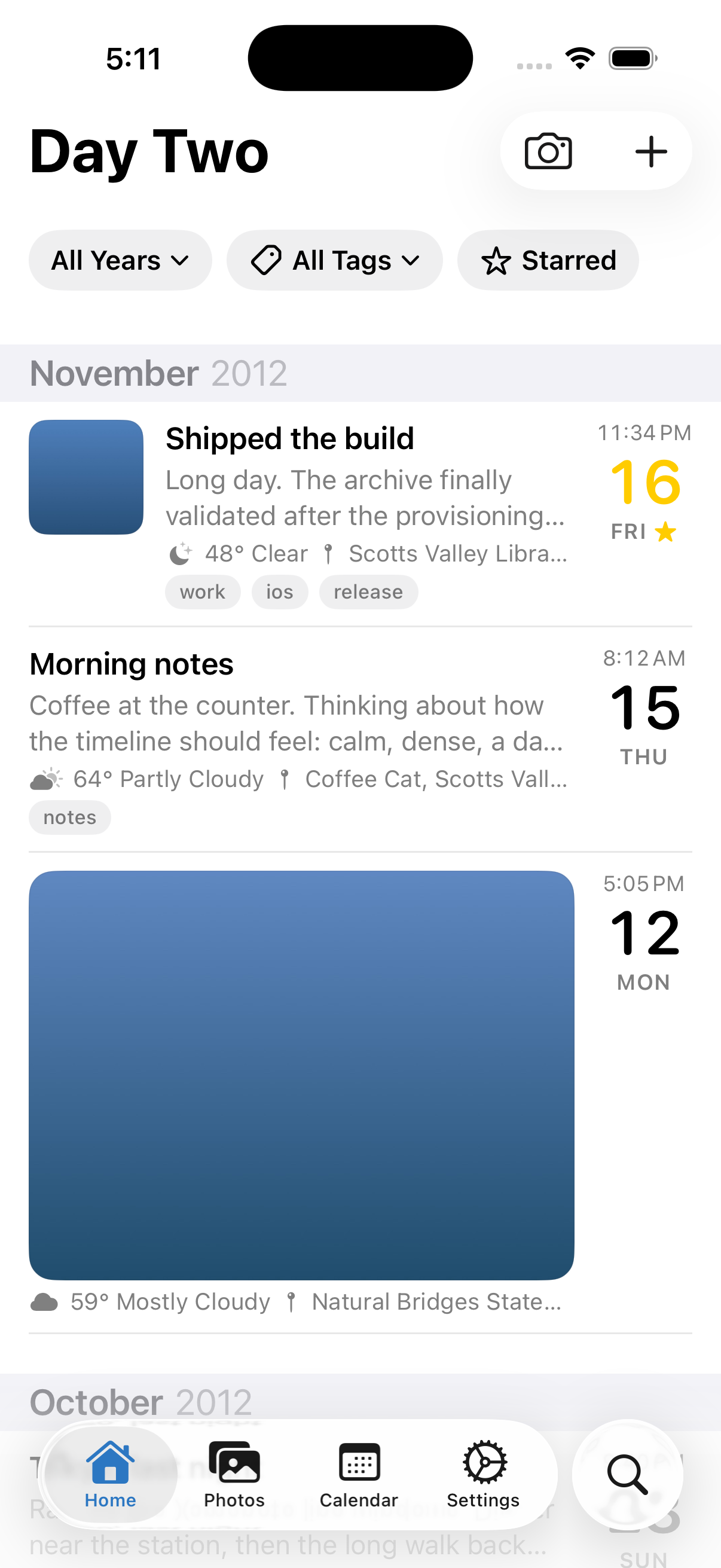
Day Two after month bands and title changes; synthetic functional fixture.

We moved from the menu to tabs for Home, Photos, Calendar, Settings and Search. I wanted the journal itself to be the first thing I saw.

Year, tag and favorite filters made the collection easier to navigate. Next, I asked for an On This Day pill before Starred, then for the same filters on Photos. With years of entries available, I wanted a few easy ways to get back into them.

This simulator screenshot shows another iteration: the title moved up, and gray month bands made the timeline easier to scan. The entries here are test content. Some subtitle behavior differed between the simulator and my phone, which was a good reminder to keep checking both.

By this point, the working pattern was familiar. I would use the app, notice something, share a screenshot or describe the problem, then try the next build.

Day 3

“MemScape?”

Actual MemScape light icon; layered dawn landscape.

We tried a few names: Jot Deck, NoteDeck, DayDeck. I already owned scapedeck.com, and that led me toward landscape, seascape and a family of “scapes.”

“MemScape?”

That was the one. I asked the agents to rename the app, choose a new color, use Apple’s system font, make an icon and retain Day One import support.

The blue 2 became a landscape at dawn: layered green ridges, a warm sky and a rising sun. Pine green replaced the Classic blue. We made light, dark and tinted icons so the app would fit the different appearances available on the iPhone.

I was starting to think about putting it in TestFlight. It still had the features I liked from the old app, but it now had its own name and identity.

This is the actual MemScape icon asset from the project.

Day 3

The same memories, a different horizon

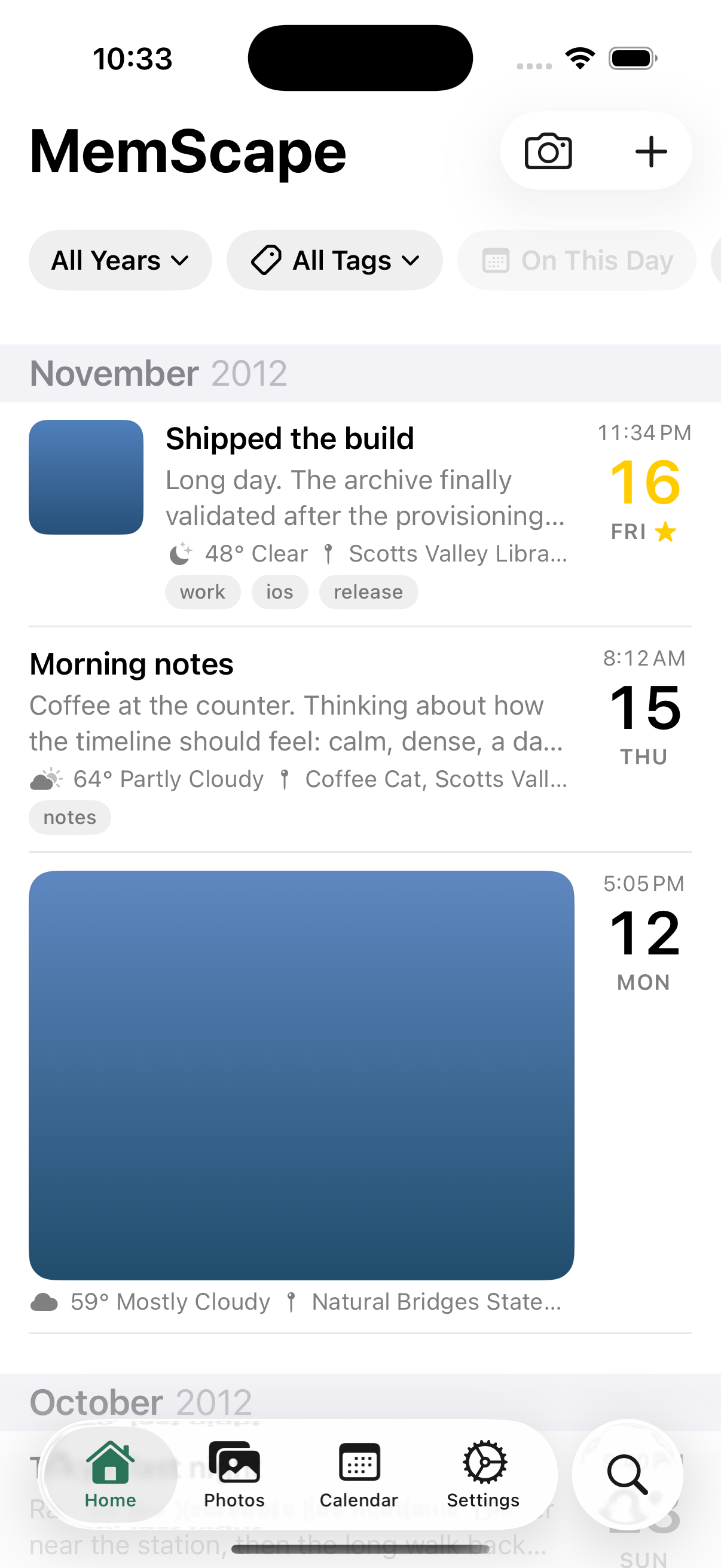
Original rebrand capture; synthetic functional fixture and placeholder images.

The structure of the journal was still familiar after the rename, but seeing MemScape at the top made it feel like its own app.

The change went beyond the toolbar. We updated bundle identifiers, permission prompts, the Files folder name, design notes and icons. We also added a TestFlight upload script.

I ran into a practical issue almost immediately. I had written a new entry in Day Two, then imported my historical backup into MemScape. We needed to bring that new entry over too. Having the journal in accessible files was useful when moving between app containers.

This October 24 simulator screenshot uses the functional test journal. The blue blocks are fixture images. The photographic showcase came later; this is what the app looked like along the way.

Day 4

The details become the design

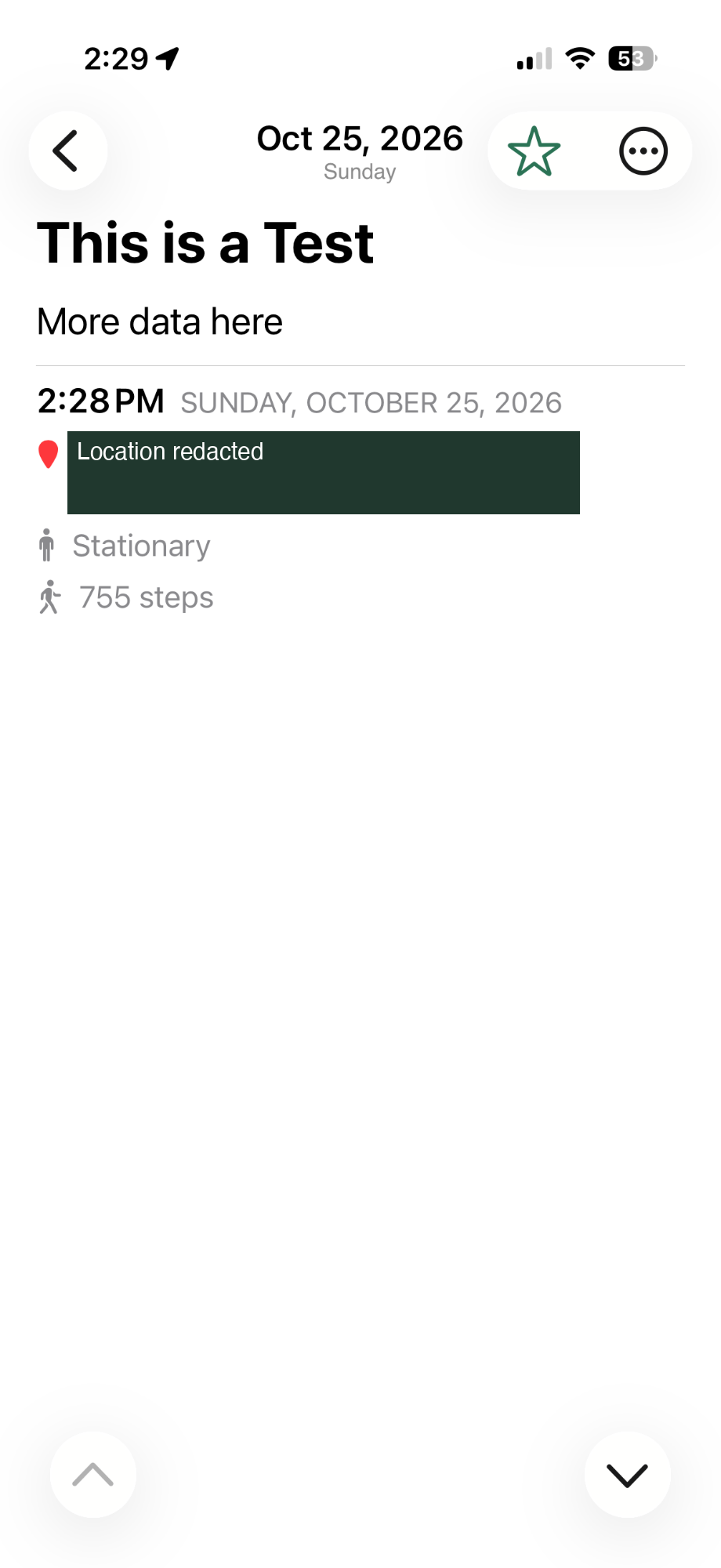
My October 25 phone screenshot before compact metadata header; test text. Home-address text redacted with an opaque mask.

Much of the fourth day came from small things I noticed while using the app.

I wanted a floating button for a new entry and editing within easy reach. The weather glyph should match the condition it described. The location needed a red pin. There was too much space around the title, and I wanted the contextual details closer to the words.

This screenshot shows my test entry before we compacted the metadata header. The date appears in more than one place, and the details sit below the body. It is a useful record of the layout we were changing.

We kept the adjustments in separate commits so they could be reviewed. I supplied examples, the agents made the changes, and I tried them on my phone.

Being able to iterate quickly helped. I still had to use the app and decide whether each change made it better.

Day 4

Giving memories their colors

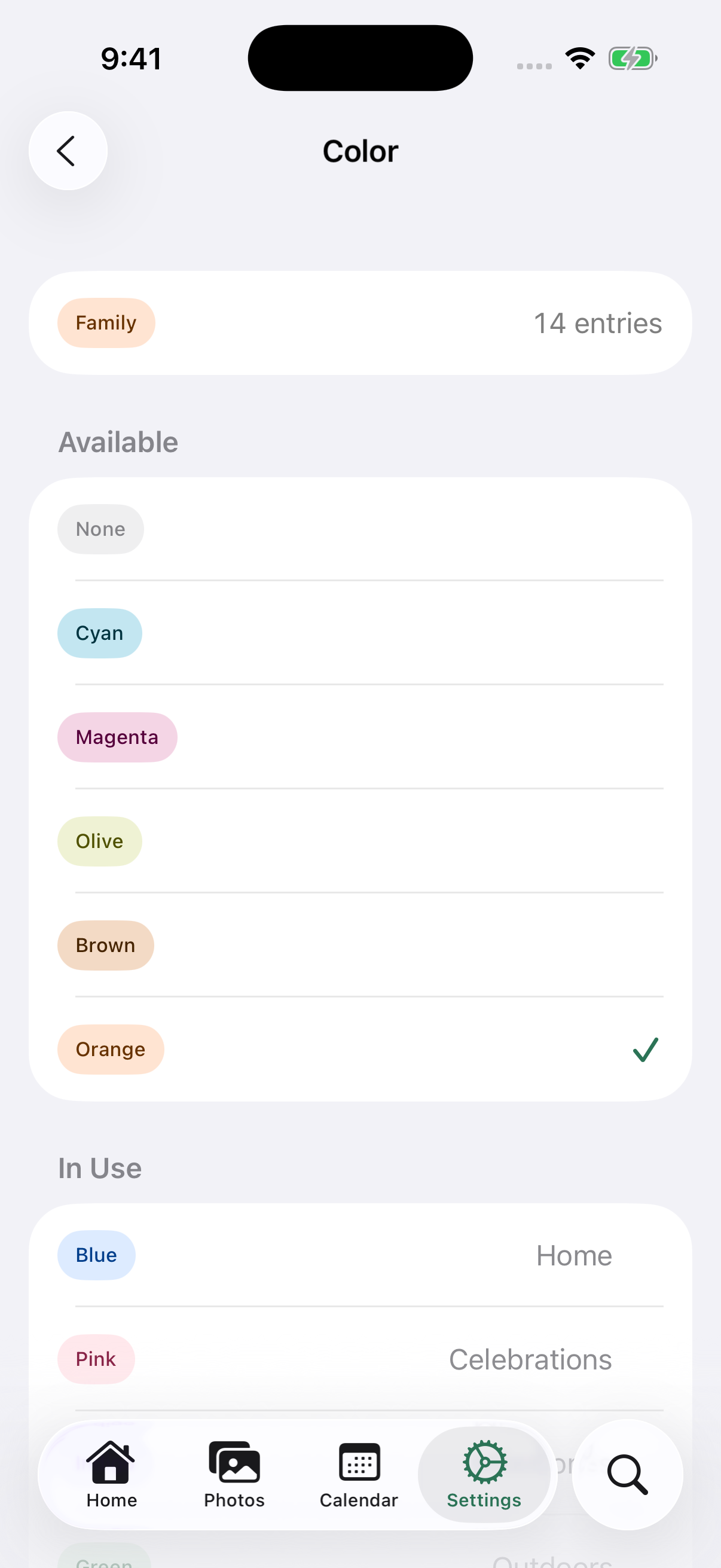
Real Color screen; fictional showcase journal.

I wanted tags to help me recognize entries at a glance, as well as find them through a filter.

Our third plan added a twelve-color palette, colored chips and dots, and a place in Settings to assign colors. We kept those choices in tags.json beside the entries, so they traveled with the journal’s files.

Seven tickets carried the change through storage, views, filtering, editing and settings. We also made sure an unreadable tag-settings file produced a visible problem instead of being quietly replaced.

This Color screen was captured on October 26 with the fictional showcase journal. The feature was built on October 25, and I completed device acceptance on October 27.

It was a small feature, but one that made the app feel much more personal.

Day 5

A calendar you can recognize

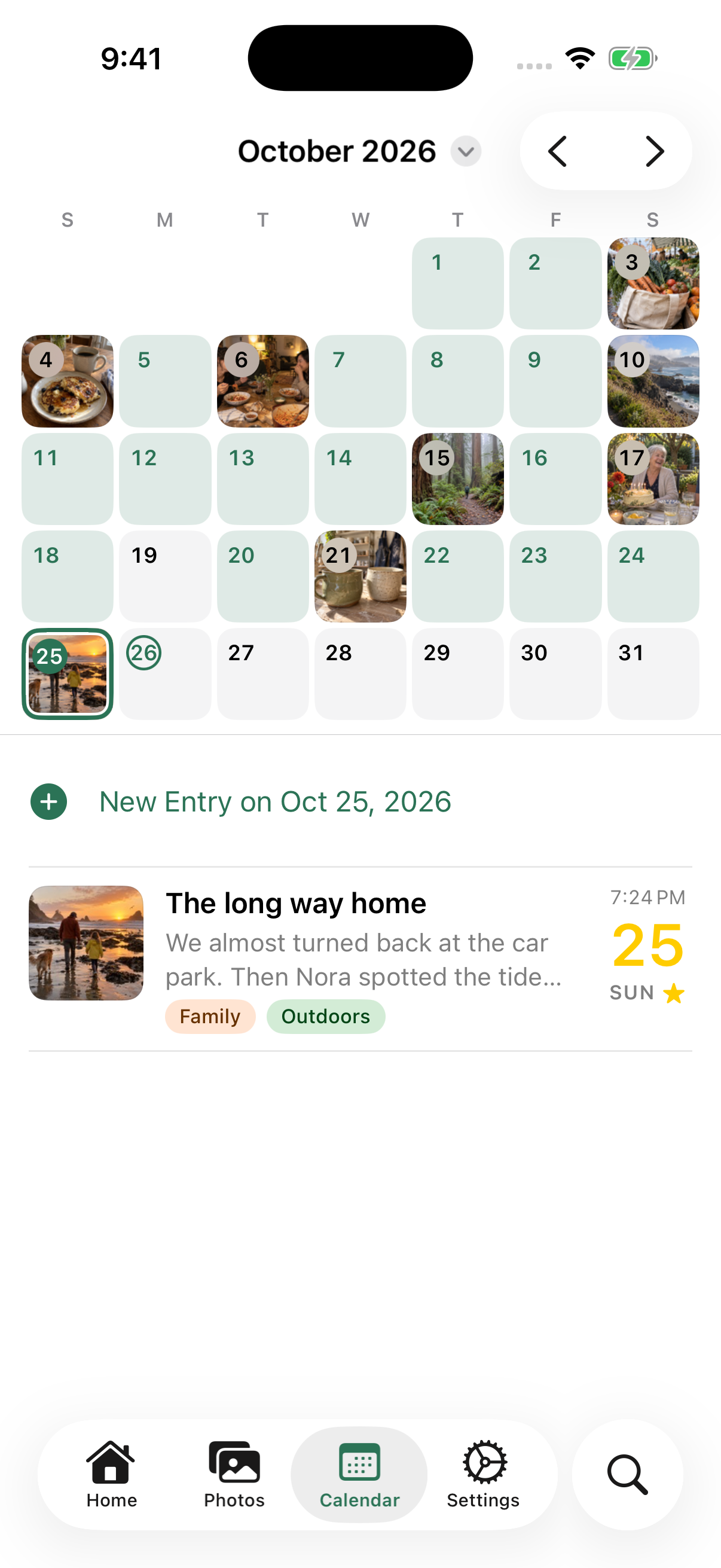
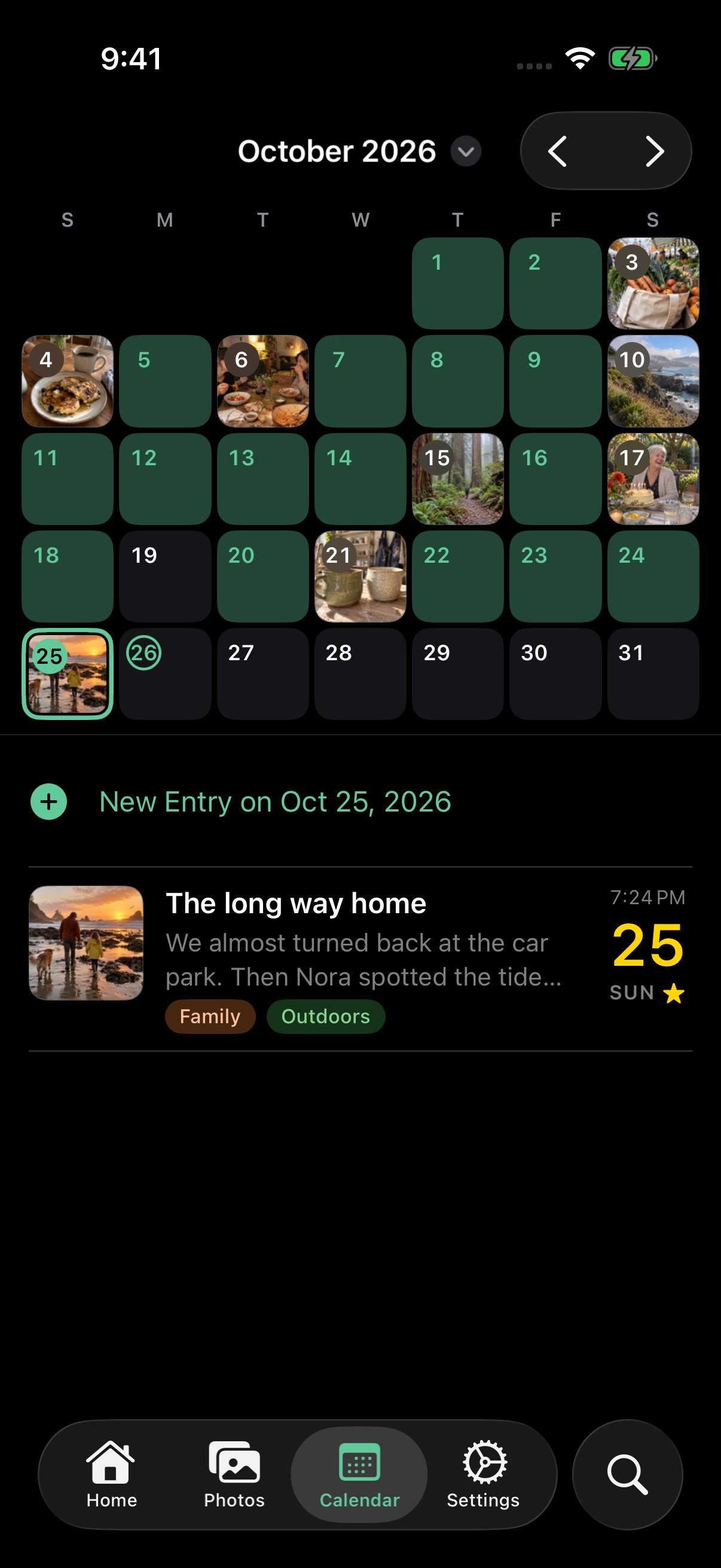
Real photo calendar; fictional entries and AI-generated in-entry photographs.

By the fifth day, the calendar gave me another way to recognize a memory.

A photograph could stand for a meal, a walk, a birthday or a trip to the coast. Days with only text still had their place, and tapping a date brought up its entries underneath.

That was what I wanted from photo tiles. Sometimes I remember the picture more clearly than the date or the title. The calendar made that a useful way to browse.

We worked through the details too. Dots marked days with entries so color was not the only clue, and the same information needed to remain legible in dark mode.

This is the actual app displaying a fictional month created for the product showcase. The photos inside those entries are AI-generated. My archive gave us real material to build against; the showcase let us demonstrate the result without using my personal entries for marketing.

Day 5

Making room for a life

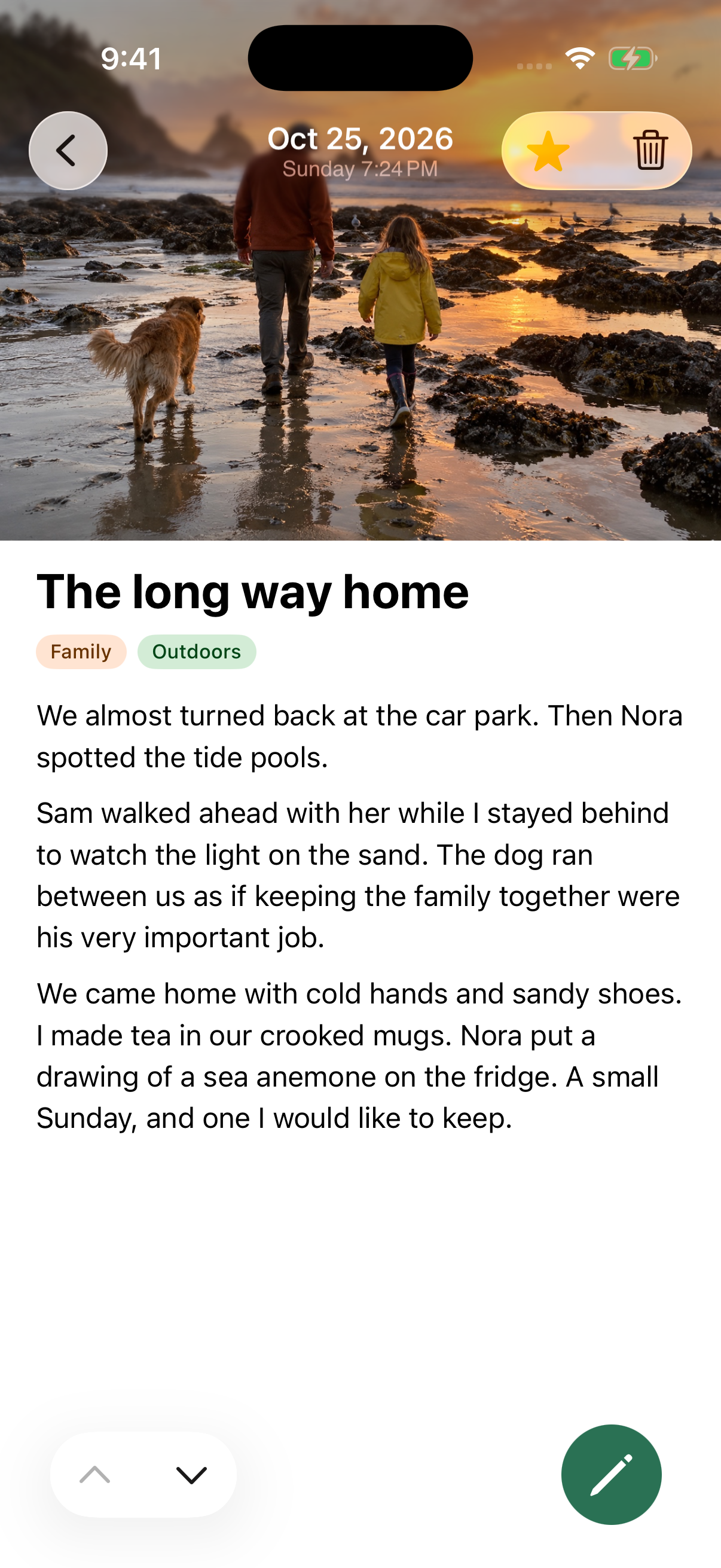
Real entry screen, The long way home; fictional story and generated photograph.

Test entries were useful for checking behavior, but I wanted the product page to show what it might feel like to keep a journal in MemScape.

We created a fictional month: family meals, a birthday, a walk, short everyday notes and longer recollections. People and places appeared more than once. Tags connected the entries, and photographs gave the calendar something recognizable to show.

Then we captured the actual app displaying that journal. The timeline, a full entry, the calendar, the photo grid and colored tags could explain the experience together. I could show the app without putting my private archive on the product page.

The entry in this screenshot is “The long way home.” By this point, we had enough of the app working to show someone how they might use it themselves.

The screenshots are real app captures. The showcase entries are fictional, and their photos are AI-generated. I wanted that distinction to be clear.

Day 5

Let the iPhone do more of the work

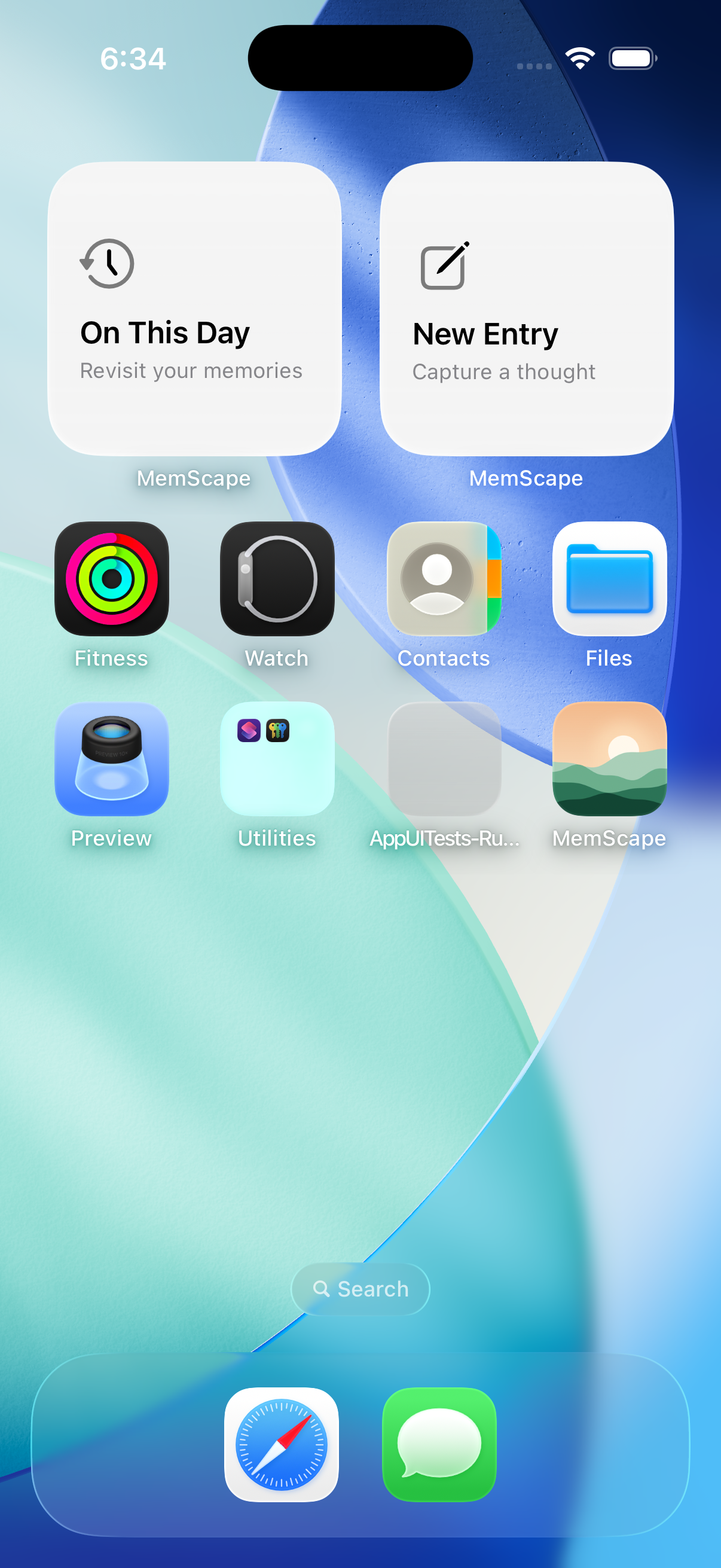
Retained simulator capture of installed On This Day and New Entry widgets.

I wanted to make better use of what the iPhone already offers.

I asked the agents to look at the native experiences used by apps recognized for their design and bring the useful ideas into MemScape. The point was to make it easier to start an entry, find something to write about and return to an old memory.

We added New Entry and On This Day widgets. A thought could start with a tap from the Home Screen. The widgets stayed quiet: they did not need to show private journal text outside the app.

Reflection prompts offered a starting point in the editor. Apple’s Journaling Suggestions could supply moments to choose from. Reminders could help build a habit. A short focused-writing session gave a Live Activity a practical job: keep track of a few minutes set aside to write.

Those ideas addressed questions I could recognize as a user. How quickly can I get to the page? What should I write about? Can I spend five minutes doing this without making it a chore?

This screenshot shows the two installed widgets during development. Some system experiences still needed integration and device checks. We had a clear direction, though: use the phone’s capabilities to make the journal easier to use.

Day 5

Keep the photograph with the memory

As we added more ways to capture a day, I kept coming back to the reason for the project: I wanted to keep my memories intact.

An entry without its photograph is only part of a memory. We had started with an old export, so getting imports and edits right mattered as much as adding new features.

Work on newer Day One exports uncovered cases where we could not yet account for every photograph safely. We paused that import option and kept the original Classic text importer available. I would rather leave a feature unfinished than have it report success while losing a picture.

We applied the same care to editing. Changing the visible part of an entry should preserve other photographs it contains. Opening something from outside the app should not displace an unfinished entry.

These changes are harder to show in a screenshot, but they are part of making an app I can trust with the journal. At the end of the fifth day, we had added a lot. Keeping the words and photographs together was still the basic promise.

Epilogue

Making the next sentence easier

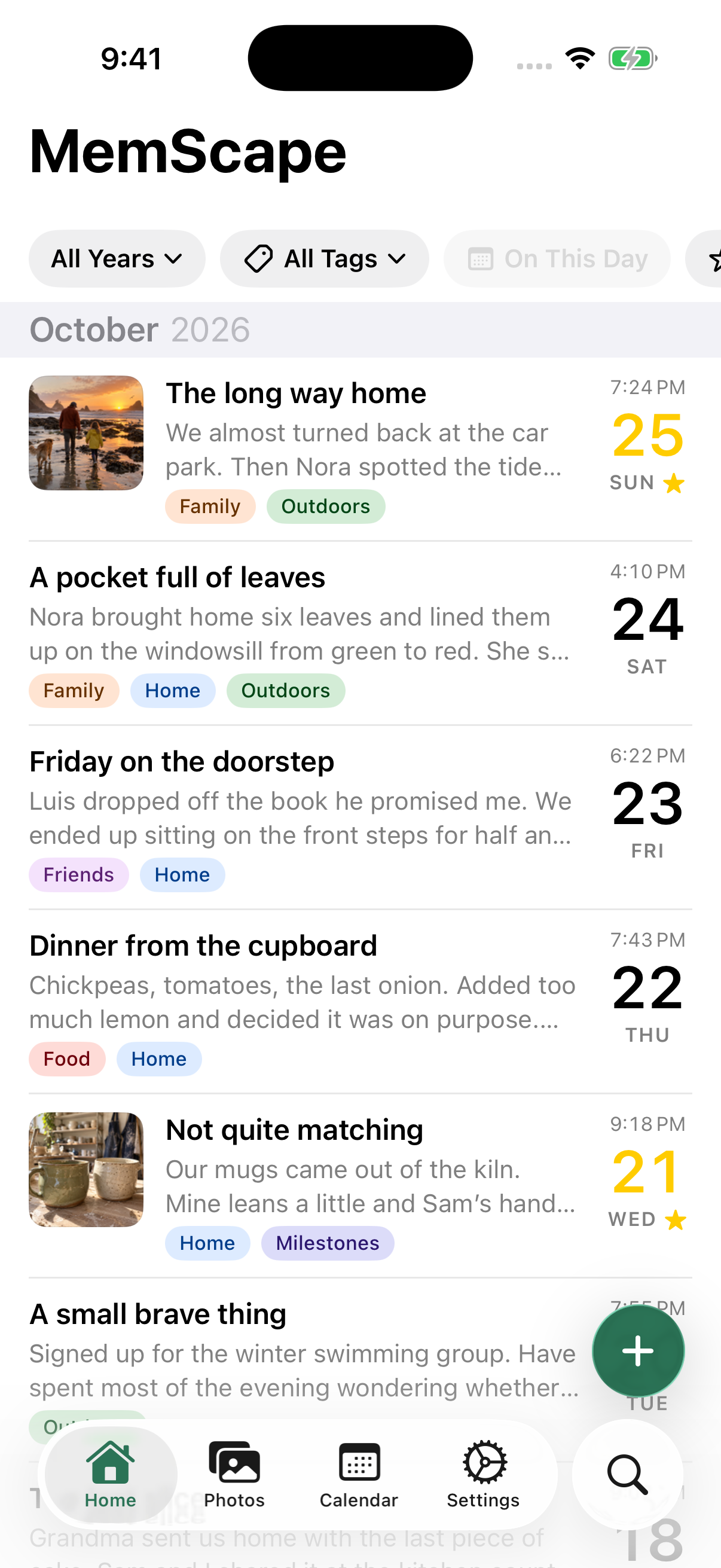
Real Home screen; fictional showcase journal.

After the five-day build, I kept using the app and finding things to improve.

On October 27, we concentrated on writing. Tapping an entry opened the editor. We made it appear immediately and made the paging arrows respond without a delay. The photo and formatting strip scrolled with the text, and the caret stayed above the controls.

These details matter when I just want to get a thought down.

We had already worked on photo panning and safer detail updates. Now I wanted those interactions to feel consistent under my thumb. Reviewing the code and trying the result on my phone answered different questions; we needed both.

The Home screenshot here is the October 26 showcase capture, before these later refinements. I am keeping it as a visual checkpoint rather than presenting it as a new capture of the next day.

Epilogue

From “only on my phone” to a limited beta

Actual MemScape dark icon.

In my first account of this project, I wrote: “Of course it can’t be published but I can enjoy it on my phone.”

By October 28, I had a public TestFlight link and a product page at mem.scapedeck.com. We described it as a limited beta.

Getting there involved more than the app screens: the name and identity, signing, review preparation, a privacy policy, support information, screenshots and publication checks. Those were the pieces needed to let someone else try it.

The beta is a work in progress. Getting it into other people’s hands was a useful next step, even with more work ahead.

This is the dark icon, with the same landscape after sunset. We had come a long way from the blue 2.

Epilogue

How five days held this much work

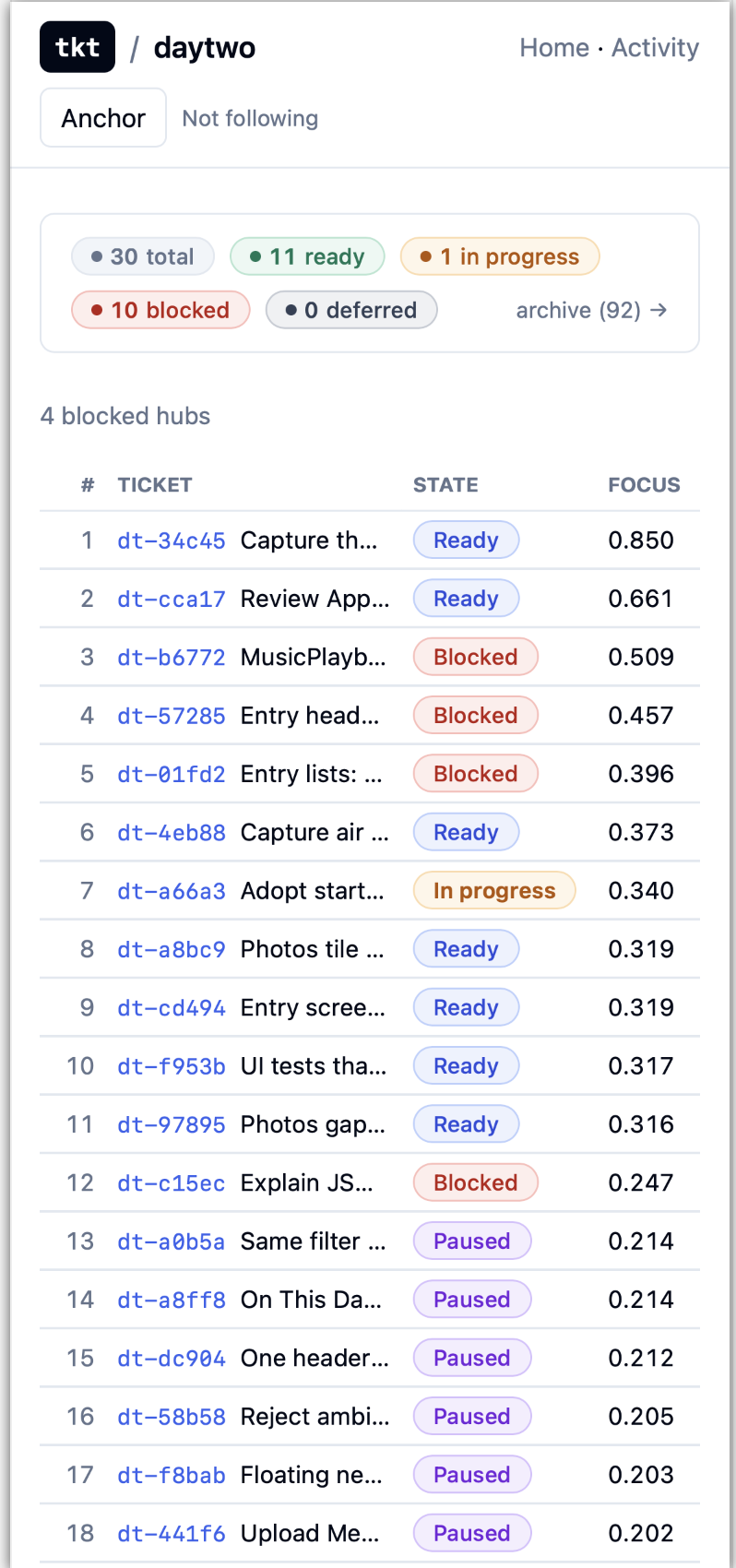
Historical tkt dashboard from my development workflow, supplied October 28; a snapshot of work states, not a live backlog.

The models were a big part of the speed. So was the environment I had already built around them.

My harness configuration, shared instructions, planning skills and the tkt ticketing system we built made a substantial contribution. They gave sessions a clear starting point and kept decisions available across handoffs. I could tell what was ready, what was blocked and what had actually been verified.

The way we wrote plans mattered. Before implementation, we worked through the experience I wanted, which unit would own each responsibility, the dependencies and what would count as success. A shared design brief helped keep the interface consistent. The agents had less to guess about.

Tier 2 tickets made that direction actionable. Each ticket carried a goal, a design, acceptance criteria, testing obligations and the relevant files. An agent could start a bounded piece of work without reopening the entire product discussion. Another agent could use the same ticket to review the result.

The tkt CLI put that workflow within reach of the agents. They could read tickets, inspect dependencies, coordinate file ownership, start work and record evidence through structured commands. I could see the same work in the web interface. Ready, in progress, blocked and paused had distinct meanings, and the record survived beyond any one conversation.

That helped us keep moving without treating every finished coding session as a finished feature. We could review a committed candidate independently, run tests for the behavior that changed, and check the result on a phone. Work could stay paused when it needed a decision or a device check.

My part also involved using the app and being specific about what bothered me: whitespace, accidental taps, photo movement, a button’s position or the time it took to open the editor. The harness and ticket system helped turn those observations into changes I could try in the next build.

I cannot assign a percentage of the speed to each tool. But I do think this setup was a large contributor to what we got done in five days. We spent less time rebuilding context, had clearer boundaries for parallel work, and could hand work between agents with fewer loose ends.

Epilogue

A journal about bringing a journal home

Real calendar in dark appearance; fictional showcase and generated in-entry photographs.

I started with photographs and words I had already collected. I wanted a good way back into them.

Now I also have a record of building that way back: the blue 2, the menu showing 1,404 entries, my first new post, the green landscape, the photo calendar and the widgets.

I put this account together with agent assistance on October 28, using our sessions, plans, tickets, commits and screenshots. It covers the October 22–26 build, with the earlier October 11 planning session and an epilogue that continues beyond the core build. The journal dates follow the work; the entry times simply put the chapters in order.

Some screenshots show my original journal. Others show test content or the fictional showcase, as identified in their captions. Only home-address text is redacted. Every app interface shown here is an actual capture.

I am still working on MemScape. But I can open the old journal again, find something I remember, and write the next entry. That is what I wanted when this started.

Epilogue

Finding a memory by place

Sometimes I remember where something happened before I remember when. A map gives those entries another way to find me.

On October 31, we added a map to Home and to Calendar. Home shows entries with locations across the journal; Calendar shows the locations for the month on display. Nearby pins can cluster, making a collection of memories easier to navigate.

We also brought the filters together. The pills keep a selection visible as I move between Home, Photos, Calendar and Search. I can narrow the journal by place alongside the other filters, and Calendar adds a year choice for finding a particular time.

On the Home map, tapping a marker selects that place and returns me to the list of matching entries. A place on the map becomes a way into the stories I wrote there.

These additions came after the earlier screenshots in this story. They are another step in making the archive useful to me: more ways to follow a thread through the memories and find something I had forgotten.